Mobile Penetration Testing

$ 700

This course will cover both Android and iOS operating systems and will address all core-level binary vulnerabilities and application-level vulnerabilities, some operating system-level vulnerabilities such as Use After Free that occur in different drivers. The data will be reviewed and evaluated, as well as how to operate and bypass the operating system defense mechanisms that are implemented on ARM processors. Other vulnerabilities that occur at the application level will also be addressed.

View full Syllabus

Out of stock

Category: Offensive Security

Hardware Requirements:

Safe Exam Browser

  • Windows 10, 11
  • macOS

Windows

  • Windows 10 and 11 are preferred.
  • Windows 7 and 8.1 will also work.
  • Dual-core processor (2+ GHz)
  • 4+ GB RAM.
  • Chrome, Firefox, or Microsoft Edge will also work.

Macintosh

  • OS X El Capitan
  • 1.2 GHz Intel Core M dual-core processor.
  • 4+ GB RAM.
  • Chrome, Firefox, or Safari will also work.

Linux

  • Ubuntu +16 – Kali Linux +2020
  • 1.2 GHz Intel Core M dual-core processor.
  • 4+ GB RAM.
  • Chrome, Firefox, or Safari browsers will also work.
Course LevelAdvanced, Beginner, Intermediate
Access TimeUnlimited
How to AccessOnline

Reviews

There are no reviews yet.

Only logged in customers who have purchased this product may leave a review.

Hands-on Labs

Awarding a Valid Certificate

Unlimited Access

Course Syllabus

Introduction

  1. Native App
  2. Web App
  3. Hybrid App
  4. Progressive Web App
  1. Principles of Testing
  2. Security Testing and the SDLC

General Vulnerabilities

  1. General Guidelines on Testing Authentication
  2. Verifying that Appropriate Authentication is in Place
  3. Best Practices for Passwords
  4. Stateful Session Management
  5. Session Timeout
  6. User Logout
  7. Two-Factor Authentication
  8. Stateless (Token-Based) Authentication
  9. OAuth 2.0 Flows
  10. Login Activity and Device Blocking
  1. Intercepting HTTP(S) Traffic
  2. Burp plugins to Process Non-HTTP Traffic
  3. Intercepting Traffic on the Network Layer
  4. Verifying Data Encryption on the Network
  5. Use Secure Communication Channels
  1. Key Concepts
  2. Identifying Insecure Cryptographic Algorithms
  3. Common Configuration Issues
  4. Cryptographic APIs on Android and iOS
  5. Cryptographic Policy
  1. Injection Flaws
  2. Cross-Site Scripting Flaws
  3. Memory Corruption Bugs
  1. Reverse Engineering
  2. Static Analysis
  3. Dynamic Analysis
  4. Tampering and Runtime Instrumentation
  5. Customizing Android for Reverse Engineering

Android Vulnerabilities

  1. Android Architecture
  2. Android Security: Defense-in-Depth Approach
  3. Android Application Structure
  4. Android Application Publishing
  5. Android Application Attack Surface
  1. Android Testing Setup
  2. Basic Testing Operations
  3. Setting up a Network Testing Environment
  1. Theory Overview
  2. Data Storage Methods Overview
  3. Local Storage for Sensitive Data
  4. Local Storage for Input Validation
  5. Logs for Sensitive Data
  6. Sensitive Data is Sent to Third Parties
  7. Keyboard Cache Is Disabled for Text Input Fields
  8. Sensitive Stored Data Has Been Exposed via IPC Mechanisms
  9. Sensitive Data Disclosure Through the User Interface
  10. Backups for Sensitive Data
  11. Sensitive Information in Auto-Generated Screenshots
  12. Checking Memory for Sensitive Data
  13. Device-Access-Security Policy
  1. Recommendations
  2. Symmetric Cryptography
  3. Configuration of Cryptographic Standard Algorithms
  4. Purposes of Keys
  5. Random Number Generation
  1. Confirm Credentials
  2. Biometric Authentication
  1. Endpoint Identify Verification
  2. Custom Certificate Stores and Certificate Pinning
  3. Network Security Configuration Settings
  4. Security Provider
  1. App Permissions
  2. Injection Flaws
  3. Fragment Injection
  4. URL Loading in WebViews
  5. Custom URL Schemes
  6. Insecure Configuration of Instant Apps
  7. Sensitive Functionality Exposure Through IPC
  8. JavaScript Execution in WebViews
  9. WebView Protocol Handlers
  10. Java Objects Are Exposed Through WebViews
  1. Making Sure That the App is Properly Signed
  2. App is Debuggable
  3. Debugging Symbols
  4. Debugging Code and Verbose Error Logging
  5. Weaknesses in Third Party Libraries
  6. Exception Handling
  7. Memory Corruption Bugs
  8. Make Sure That Free Security Features Are Activated
  1. Reverse Engineering
  2. Static Analysis
  3. Dynamic Analysis
  4. Tampering and Runtime Instrumentation
  5. Customizing Android for Reverse Engineering
  1. Root Detection
  2. Anti-Debugging Detection
  3. File Integrity Checks
  4. Reverse Engineering Tools Detection
  5. Emulator Detection
  6. Runtime Integrity Checks
  7. Obfuscation
  8. Device Binding

iOS Vulnerabilities

  1. iOS Security Architecture
  2. Software Development on iOS
  3. Apps on iOS
  1. iOS Testing Setup
  2. Basic Testing Operations
  3. Setting Up a Network Testing Environment
  1. Local Data Storage
  2. Logs for Sensitive Data
  3. Sensitive Data Is Sent to Third Parties
  4. Sensitive Data in the Keyboard Cache
  5. Sensitive Data Is Exposed via IPC Mechanisms
  6. Sensitive Data Disclosed Through the User Interface
  7. Backups for Sensitive Data
  8. Auto-Generated Screenshots for Sensitive Information
  9. Memory for Sensitive Data
  1. Configuration of Cryptographic Standard Algorithms
  2. Key Management
  3. Random Number Generation
  1. Local Authentication
  2. Note regarding temporariness of keys in the Keychain
  1. Network Framework
  2. URLSession
  3. App Transport Security
  4. Custom Certificate Stores and Certificate Pinning
  1. App Permissions
  2. Sensitive Functionality Exposure Through IPC
  3. Custom URL Schemes
  4. iOS WebViews
  5. WebView Protocol Handlers
  6. Native Methods Are Exposed Through WebViews
  7. Object Persistence
  8. Enforced Updating
  1. Making Sure that the App Is Properly Signed
  2. App is Debuggable
  3. Debugging Symbols
  4. Debugging Code and Verbose Error Logging
  5. Weaknesses in Third Party Libraries
  6. Exception Handling
  7. Memory Corruption Bugs
  8. Make Sure That Free Security Features Are Activated
  1. Reverse Engineering
  2. Static Analysis
  3. Dynamic Analysis
  4. Binary Analysis
  5. Tampering and Runtime Instrumentation
  1. Jailbreak Detection
  2. Anti-Debugging Detection
  3. File Integrity Checks
  4. Reverse Engineering Tools Detection
  5. Emulator Detection
  6. Obfuscation
  7. Device Binding

Course Quality

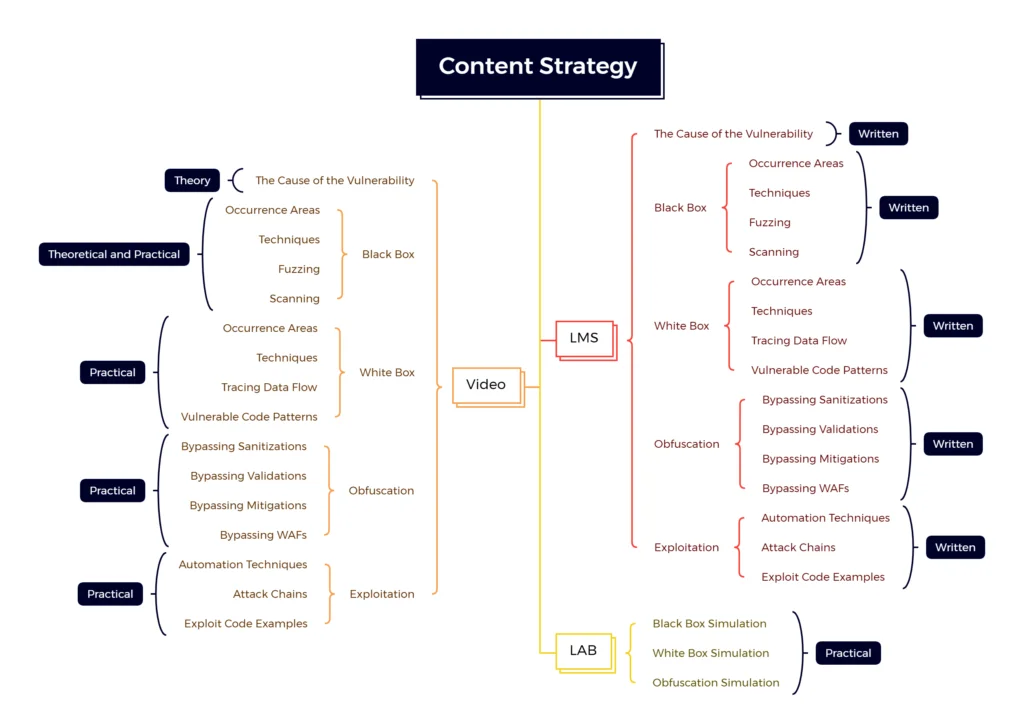
  • In cybersecurity training courses, all dimensions and aspects of a subject are not always addressed, and this issue causes the operational capacity of students to decrease significantly, but in this course, all issues have been addressed:
  1. The cause of the vulnerability event
  2. How to detect vulnerability as a black box
  3. How to discover vulnerability as a white box
  4. How to obfuscate and bypass defense mechanisms
  5. How to exploit and design the exploitation chain

Several courses are offered in one course

Mobile Penetration Testing (Beginner)20%

20%

Mobile Penetration Testing (Advanced)40%

40%

Mobile Penetration Testing (Bug Bounty)60%

60%

Mobile Penetration Testing (Red Team)80%

80%

Mobile Penetration Testing (Full)100%

100%

Learning Management System

  • The online education management system will have the task of intelligent and browser-based guidance of users, as well as the establishment of theoretical and practical tests.
  • Another task of this system will be to record the duration of courses and completion of course topics, so that it can finally display accurate statistical information to the companies applying for human resources and the users themselves.
  • In this system, there are two contents of the course, the first is the educational videos of each lesson and their topics, the second is an online booklet, which is presented on the page of each lesson and all the points of that topic, and users can read them in the LMS system.
  • It should be noted that the videos and texts of the training course are only available through the LMS system and cannot be downloaded or copied, of course, course users will always have access to the training system for a lifetime.

Hands-on Labs

  • Another feature of this course is to have online Hands-on Labs that are designed for each of the Syllabus topics, at least three to five different scenarios and with the approach of the real event environment of that topic.
  • Access to each of the lab sections is such that any lesson that is opened to users according to the LMS educational path, will be available to users according to that lesson’s online laboratory section, and as long as the user has operational challenges If you don’t do it, the next lesson won’t open.
  • The duration of access to each part of the online laboratory is unlimited, of course, until the user passes the practical challenge. If the challenge is passed, that challenge will be removed from the user’s reach and the next challenges will be opened.
  • An information counter has been placed in the online laboratory to track all the events and academic trends of the users and show them to the users themselves, this information will also be used in order to rank the users.

Theory and Practical Exam

  • Each lesson has a four-choice theory test that is based on the material taught, and the student must pass this test by taking this test and scoring more than 70.
  • After taking the theory test and scoring more than 70, the student can proceed to the practical test and solve the test challenge in the practical laboratory.
  • If both the theoretical and scientific challenges are passed, the next lesson of the course will be opened. Otherwise, the lesson will not be opened.
  • At the end of the course, a completely realistic theory and practical test with CTF standards has also been designed, and whatever score the student receives in this final test, that score will be recorded in the course certificate.

Tools Installer

  • In the training courses of the Unk9vvN research team, users are given two installer tools that prepare their Linux and Windows operating systems to be used in order to perform operational commands in the real world.
  • The first installer is for basic Linux operating systems such as Ubuntu and Kali Linux and the second installer is for basic Windows operating systems such as Windows 11 and Windows Server.
  • These installation tools speed up the preparation process of the operational laboratory and can easily prepare the operating system environment from the required tools of the course.

Cheat Sheet and Checklist

  • For each training course, a cheat sheet is provided, which is designed as a complete, dedicated manual and is provided to users, this manual is aimed at facilitating the implementation of test operations that users should use in the operational part, these manuals It will include the introduction of quality tools and how to use them for all kinds of tests.
  • In addition to the cheat sheet, a comprehensive and complete checklist is provided so that users, after learning the lessons presented in the course, based on that checklist and cheat sheet, can perform security assessments and specifically discover weak and vulnerable points.

Association with Teachers

  • Course users can be in direct contact with professors on two communication platforms, the first is the Discord program for weekly voice question and answer sessions, the second is the Telegram program and a semi-private group for raising questions and specialized discussions with professors and course designers.
  • The training courses of the Anon research team are not based on one person and are designed by a team, therefore, in relation to any technical problems or questions, users can communicate with the designers and professors of the course on the mentioned platforms on a daily basis. And raise their issues.

Domestic and Foreign Jobs

  • Offensive security specialties, especially penetration testing, are always offered alongside defensive security services, and experts in this field can provide great help to a professional cybersecurity solution. Therefore, penetration testing jobs are always needed both inside Iran and outside Iran, and they offer appropriate salaries.
  • To check penetration testing jobs in Iran, you can refer to jobvision.ir and jobinja.ir, and also for jobs in this field outside of Iran, you can refer to infosec-jobs.com and indeed.com websites. Evaluate the careers of this field.

FAQ

  1. Basics of Network
  2. Basics of Linux
  3. Basics of JSON and XML
  4. Basics of Java
  5. Basics of Kotlin
  6. Basics of Swift
  7. Basics of Smali
  8. Professional Python
  • Red team members
  • Vulnerability assessment experts
  • Penetration testers
  • Security consultants
  • Developers
  • IT managers
  • System Architects
  • Software students
  • You can perform an in-depth analysis of the open source code of web applications without compilation.
  • Identify logical vulnerabilities that many enterprise scanners fail to detect.
  • Participating in bug bounty programs and discovering Critical level vulnerabilities.
  • Providing web penetration testing services at the organizational and public level.

Similar Courses